
Error: Unknown Command “STLP”
Symptoms
When you click a SteelPLUS toolbar button, AutoCAD displays:
Unknown command: STLPIn most cases, this is caused by an AutoCAD startup or configuration issue rather than a problem with the SteelPLUS installation itself.
Solution 1: Verify You’re Loading the Correct Version
If you’ve recently upgraded AutoCAD or installed a newer version of the SteelPLUS Bundle, AutoCAD may still be referencing files from an older release.
For example:
- SteelPLUS Bundle for AutoCAD 2025 was previously installed.
- You have now installed SteelPLUS Bundle for AutoCAD 2027.
- AutoCAD is still loading the 2025 customization files.
If this is the case:
- Remove the previous SteelPLUS customization files using the CUILOAD command.
- Open AutoCAD Options and remove any Support File Search Path entries that reference the older SteelPLUS version.
- Close and restart AutoCAD.
- Load the current SteelPLUS version using the installation SCRIPT file.
If the toolbar loads but the Unknown Command message still appears, continue to the next solution.
Solution 2: Add SteelPLUS to the Startup Suite
Occasionally, AutoCAD does not automatically load the SteelPLUS startup file.
Adding the SteelPLUS startup file to AutoCAD’s Startup Suite ensures it loads each time AutoCAD starts.
1. Start the APPLOAD Command
At the AutoCAD command prompt, type:
APPLOAD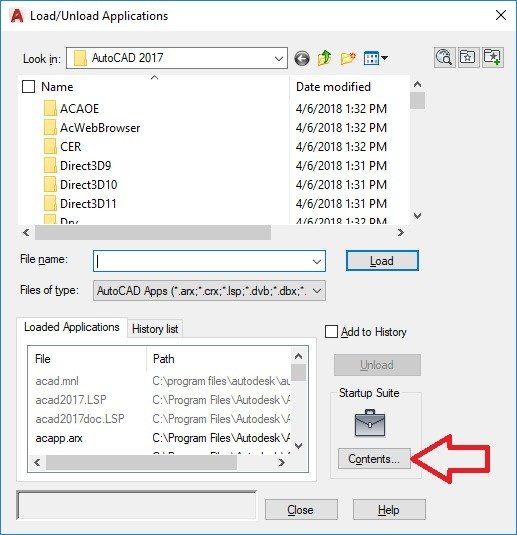
2. Open the Startup Suite
Click:
Startup Suite → Contents
3. Add the SteelPLUS Startup File
Browse to the SteelPLUS Support folder.
Example:
C:Program Files (x86)SoftDraftSteelPLUSVR2027SupportSteelPLUS.lsp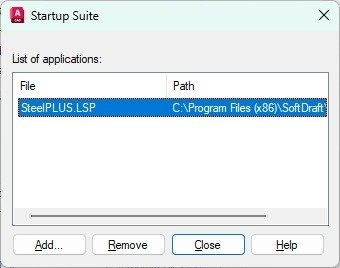
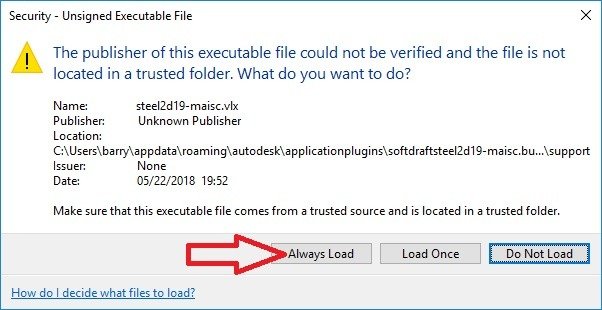
AutoCAD Security Prompt
After restarting AutoCAD, you may see an Unsigned Executable File security warning.
If prompted, click Always Load for each SteelPLUS application.
If the Problem Continues
If the Unknown Command “STLP” message still appears after completing the steps above, verify the following:
- The correct SteelPLUS version is installed for your AutoCAD version.
- The SteelPLUS support folder is included in the Support File Search Path.
- The SteelPLUS customization file (SteelBundlex64.cuix) is loaded.
- The SteelPLUS startup file (SteelPLUS.lsp) has been added to the Startup Suite.
If all of these items have been verified and the problem persists, contact SoftDraft Technical Support for additional assistance.
Tip: The Unknown Command “STLP” message almost always means that AutoCAD did not load the SteelPLUS startup file. The software is typically still installed correctly—the startup routine simply needs to be restored.