
Configure the SteelPLUS Network Path
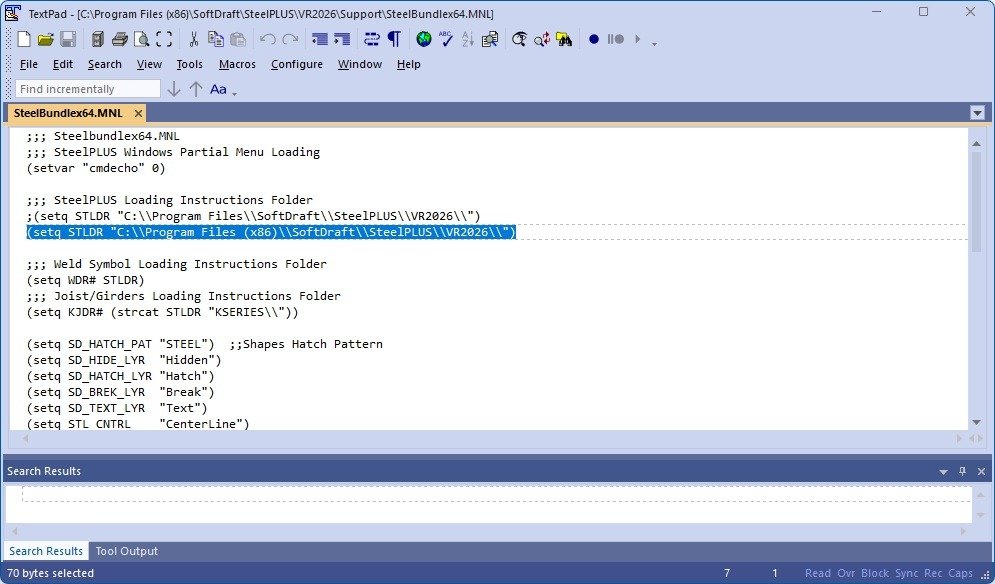
After installation, the SteelPLUS loader must be updated so each workstation knows where the shared installation is located.
Locate the following file:
...SteelBundlex64.MNLPlease open the file to edit the path only with Notepad.
Locate the following line. Yours may be different based on the version of SteelPLUS Bundle you purchased:
(setq STLDR "C:\\Program Files (x86)\\SoftDraft\\SteelPLUS\\VR2026\\")Modify it to point to your shared SteelPLUS installation.
Example using a mapped network drive:
(setq STLDR "K:\\Programs\\SteelPLUS\\VR2026\\")Example using a UNC network path:
(setq STLDR "\\\\ServerName\\Programs\\SteelPLUS\\VR2026\\")Important
AutoLISP strings require each backslash (\) to be entered as two backslashes (\\). When using a UNC network path, each leading backslash must also be doubled.
Save the file after making your changes.
The SteelPLUS installation is now ready to be configured on each workstation.